Test an Xbox controller in your browser
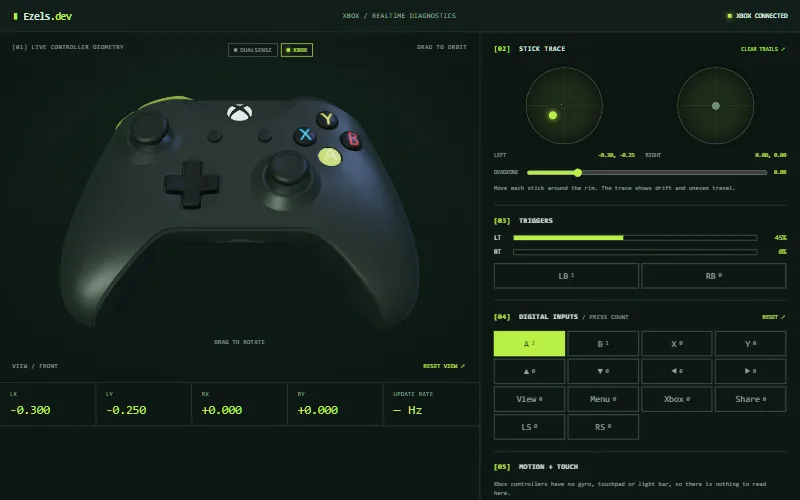
Connect your Xbox controller, press a button, and the tester above shows every input as you make it: buttons, d-pad, both sticks, bumpers and the analog triggers.
Updated
How to test an Xbox controller
- Connect the controller with a USB cable, over Bluetooth, or with an Xbox Wireless Adapter. To pair over Bluetooth, hold the pairing button on the top edge until the Xbox button flashes quickly.
- Click anywhere on this page, then press a button. Browsers only show a controller to a page after you use it.
- The status in the top right changes to "XBOX CONNECTED", and the 3D model presses the same buttons you do.
- Move both sticks around their rims, pull both triggers fully, and press every button, including the stick clicks.
What the Xbox controller test shows
| Control | Where it appears |
|---|---|
| A, B, X, Y, d-pad, View, Menu, Xbox, left and right stick clicks | Digital inputs panel with press counts, and the 3D model |
| Share | The "Share" input, when your browser reports it |
| LB and RB bumpers | Bumper inputs under the trigger meters, and the 3D model |
| LT and RT triggers | Trigger meters from 0 to 100%, and the 3D model |
| Left and right sticks | Live X/Y values, the stick trace and the deadzone ring |
Which Xbox controllers are recognised
The tester treats a controller as an Xbox controller when the name or vendor ID your browser reports mentions Xbox, Microsoft or XInput. That covers Xbox Series X|S, Xbox One and Xbox 360 controllers. Many third-party controllers that use XInput are reported to browsers as an Xbox 360 controller, so they appear on the Xbox layout too.
If a PlayStation controller shows up here, a utility such as Steam Input or DS4Windows is probably presenting it to the browser as a virtual Xbox controller. Close it and reload, or see the PS5 controller tester.
What Xbox controllers do not show here
Xbox controllers have no gyro, touchpad or light bar, so the Motion + Touch panel has nothing to read and the Enable HID features are DualSense-only. The tester also doesn't test vibration or the motors in the triggers, and the extra paddles and profile buttons on Elite controllers are not drawn.
To judge stick wear, use the stick drift test. For buttons that register twice or triggers that do not reach 100%, use the button and trigger test.
Frequently asked questions
Does the tester work with the Xbox Series X|S controller?
Yes, as long as your browser reports it as an Xbox or Microsoft device, which current Chrome, Edge and Firefox do. All standard controls are drawn. The Share button appears only if your browser reports it.
Why does my Xbox controller not show up?
Press a button while the page is in focus first, since browsers hide controllers until then. Then check the cable, close other apps that might hold the controller, and try reconnecting. The controller not detected guide has the full list.
Can I test an Xbox controller over Bluetooth?
Yes. The browser sees a Bluetooth controller the same way it sees a wired one, once the operating system has paired it. Wired and wireless inputs look identical in the tester.
Why do the triggers not read exactly 0% and 100%?
Triggers report an analog value, and the exact resting and maximum values differ between controllers and drivers. Small offsets are common. A trigger that cannot reach close to 100%, or that jumps around while held still, is worth investigating; the button and trigger test explains how.
Does this tester vibrate my Xbox controller?
No. It only reads input and sends nothing to the controller, so it does not test rumble.