Test every button and trigger
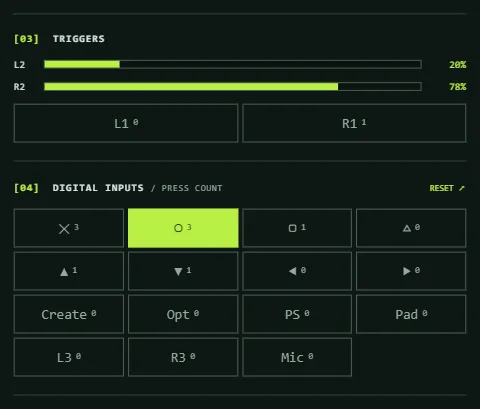
Each button has its own press counter and each trigger has an analog meter. Together they show which controls register, which register twice, and whether a trigger travels smoothly from 0 to 100%.
Updated
How to test your buttons
- Connect your controller, press a button so the tester detects it, and pick the matching tab above the 3D view.
- In the Digital inputs panel, press Reset to zero every counter.
- Press each button once, deliberately, and check that its counter goes up by exactly one and that the 3D model presses the same button.
- Do the same for the d-pad directions, both stick clicks and the bumpers, which sit under the trigger meters.
Spotting a button that registers twice
A counter increases each time its button goes from released to pressed. If a single press makes the counter jump by two, the button is registering twice (sometimes called chatter or double-clicking). Press the same button ten times at an even pace; a healthy button ends on exactly 10.
A button that never lights up its input, or lights up only when pressed hard on one side, points to worn contacts or a stuck button. A button that stays lit after you let go is stuck. If several buttons misbehave at once, try another cable or port first, because connection faults can look like button faults.
How to test the triggers
- Watch the L2 and R2 meters (LT and RT on Xbox) with the triggers released. Both should rest at or very near 0%.
- Pull one trigger slowly to the end of its travel. The meter should rise smoothly and reach close to 100%.
- Release it slowly. The meter should fall back to about 0% without sticking at a middle value.
- Repeat with the other trigger and compare the two.
What the trigger readings mean
- Smooth rise and fall means the trigger and its sensor are working.
- A trigger that jumps from 0% straight to 100% is being reported as a button instead of an analog axis. Some controllers and drivers do this.
- A trigger that never gets close to 100%, or rests above 0%, can be worn, dirty or miscalibrated. Small offsets of a few percent are common.
- A meter that wobbles while the trigger is held still points to a faulty sensor or a poor connection.
What the tester does not measure
- The update rate is how often the page sees new controller data. It reads the controller once per screen refresh, so it is capped by your display and is not a measurement of the controller's polling rate.
- The DualSense mic mute button only registers after you press Enable HID, because the Gamepad API does not report it.
- The DualSense's adaptive trigger resistance and the Xbox trigger motors are outputs, and this tester sends nothing to the controller.
Stick wear is covered by the stick drift test. For model-specific notes, see the PS5 controller tester and the Xbox controller tester.
Frequently asked questions
How do I know if a controller button is broken?
Press it once and check its counter. If the counter does not move, or the input does not light up, the press is not registering. If the counter jumps by two, it registers twice. Try another cable or port first, so you know the fault is in the button.
Why doesn't my L2 or R2 trigger reach 100%?
Triggers report an analog value, and the maximum differs slightly between controllers, so a few percent short is common. A trigger that stops well short, or rests above 0% when released, may be worn, dirty or miscalibrated.
What do the press counters count?
Each counter goes up once every time its button changes from released to pressed. Holding a button down counts as one press. The counters are kept per controller type, and Reset sets the current one to zero.
Does the update rate show my controller's polling rate?
No. The page reads the controller once per screen refresh, so the number is limited by your display and shows how often new input is seen, not the controller's own rate.
Can I test the DualSense mute button?
Yes, in desktop Chrome or Edge. Press Enable HID in the Motion + Touch panel and choose your controller; the mute state then appears as the Mic input and an orange glow on the model.