Fix a controller that isn't detected
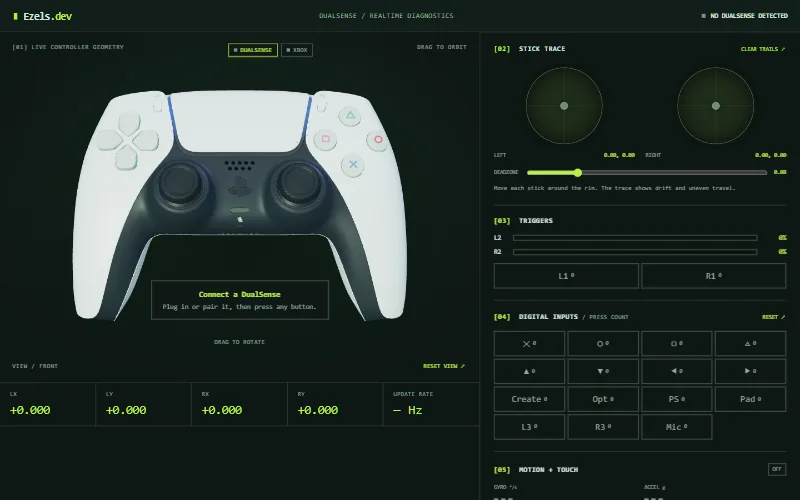
The tester above says "No controller detected" until the browser hands it a controller. Work through the fixes below in order, and keep the tester open: its status changes the moment a fix works.
Updated
Start here: press a button on the page
Browsers do not reveal a connected controller to a page until you use it. Click anywhere on this page so it has focus, then press a button or move a stick. Firefox goes further and only shows controllers after you interact with one while the page is visible. If the status in the top right still reads "NO DUALSENSE DETECTED" or "NO XBOX DETECTED", carry on.
If you use a USB cable
- Use a cable that carries data. Many cables only charge, and a charge-only cable powers the controller but never shows it to the computer.
- Plug straight into the computer rather than a hub or a monitor port, and try a different port.
- Unplug and reconnect, then press a button on the controller.
If you use Bluetooth
- Put the controller into pairing mode and pair it in your operating system first. A DualSense pairs when you hold PS and Create until the light bar flashes, a DualShock 4 with Share and PS, and an Xbox controller with its pairing button on the top edge.
- If it was paired before and will not connect, remove it from the operating system's Bluetooth device list and pair it again.
- Charge the controller. A nearly empty battery can drop the connection.
Close apps that grab the controller
Some programs take exclusive control of a controller, or replace it with a virtual one. Close Steam (including Big Picture and Steam Input), DS4Windows, manufacturer apps, emulators and any game that is running, then reload this page and press a button.
Utilities such as Steam Input and DS4Windows can also present a PlayStation controller to the browser as a virtual Xbox controller. If the Xbox tab shows as connected while you are holding a PlayStation controller, that is why.
Check that your computer sees the controller
If the operating system does not list the controller, the browser cannot either. On Windows, press Win+R and run joy.cpl to see the connected game controllers and test them. If it is missing there, the problem is the cable, the Bluetooth pairing or the driver, not this page.
Try the browser itself
- Update the browser and restart it.
- Open the page in a private or incognito window to rule out extensions, or try another browser. The Gamepad API is supported in current Chrome, Edge, Firefox and Safari.
- Browsers on different operating systems can report the same controller under different names. The tester shows a connected controller it does not recognise on the tab you have selected, using that tab's labels.
Advanced: ask the browser what it sees
Press a button on the controller, open the browser console (Ctrl+Shift+J on Windows and Linux, Cmd+Option+J on a Mac) and run navigator.getGamepads(). An entry that is not null is a controller the browser can see, and its id is the name it reports. Hovering over the status in the top right of the tester shows the same name for the controller it is using.
If the list is empty after you press a button, the browser has not been given the controller by the operating system, so the fix lies in the cable, pairing or driver. For browser support details, see browser compatibility.
After it is detected
Once the status shows your controller as connected, use the button and trigger test or the stick drift test to check it properly.
Frequently asked questions
Why does my browser say no controller detected?
Usually because no button has been pressed since the page loaded, the cable only charges, another app is holding the controller, or the Bluetooth pairing needs repeating. Press a button on the page first, then work through the fixes above.
Why does my controller work in games but not in the browser?
Games and launchers can read controllers through other interfaces, or through Steam. A browser only uses the Gamepad API, and only shows a controller after you use it on the page. An app that has grabbed the controller can also hide it from the browser.
Do I need to install a driver?
The browser uses whatever the operating system already provides, so there is nothing to install for this page. If the operating system itself does not see the controller, fix that first.
Can the tester detect a controller connected to my console?
No. A web page can only see controllers connected to the device the browser runs on.
Why does my PS5 controller show as an Xbox controller?
A utility such as Steam Input or DS4Windows is probably presenting it to the browser as a virtual Xbox controller. Close it, reload the page and press a button again.