Test a PS5 DualSense controller in your browser
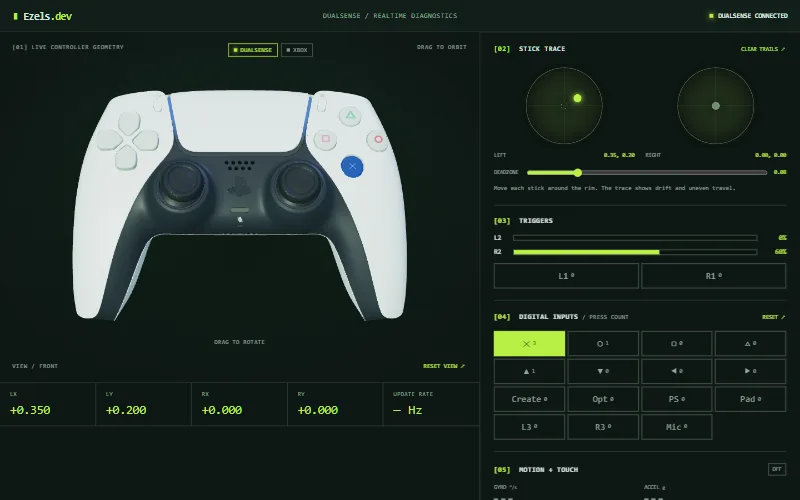
Plug in or pair your DualSense, press any button, and the tester above shows what the controller reports: buttons, sticks and triggers in any modern browser, and motion, touchpad and battery in desktop Chrome or Edge.
Updated
How to test a DualSense
- Connect the controller with a USB-C data cable, or pair it over Bluetooth by holding the PS and Create buttons until the light bar flashes.
- Click anywhere on this page, then press a button. Browsers only show a controller to a page after you use it.
- The status in the top right changes to "DUALSENSE CONNECTED" and the 3D model starts following your inputs.
- Optional: in the Motion + Touch panel, press Enable HID and choose the controller in the browser prompt to see gyro, touchpad and battery.
What the PS5 controller test shows
| Control | Where it appears | Needs Enable HID? |
|---|---|---|
| Cross, Circle, Square, Triangle, d-pad, L1, R1, L3, R3, PS, Create, Options | Digital inputs panel (L1 and R1 sit under the trigger meters) with press counts, and the 3D model | No |
| Touchpad click | The "Pad" input and the 3D model | No |
| L2 and R2 triggers | Trigger meters from 0 to 100%, and the 3D model | No |
| Left and right sticks | Live X/Y values, the stick trace and the deadzone ring | No |
| Gyroscope and accelerometer | Readouts in °/s and g; the 3D model rotates with the controller | Yes |
| Touchpad fingers | A map of up to two touch points | Yes |
| Battery level and charging | Percentage next to the status | Yes |
| Mic mute button | The "Mic" input and the orange glow on the model | Yes |
Why motion, touchpad and battery need Enable HID
The browser Gamepad API reports buttons and sticks, nothing else. Gyro, touchpad positions, battery and the mute button live in the controller's raw HID reports, which browsers expose through WebHID. WebHID works in desktop Chrome, Edge and Opera, so Firefox and Safari show everything except those extras (see browser compatibility).
When you press Enable HID the browser asks which device to connect to, and the list only offers DualSense and DualSense Edge controllers. The tester only reads from the controller: it doesn't send vibration, light or settings commands. If the controller can't be opened, close other apps that use it, such as Steam or DS4Windows, and try again.
USB or Bluetooth
Both work for buttons, sticks and triggers, because the operating system hands the controller to the browser either way. USB needs a cable that carries data; a charge-only cable powers the controller but is never detected.
Over Bluetooth a DualSense starts in a basic mode that does not include motion data. When you press Enable HID, the tester asks the controller to switch to its full reports automatically.
Light bar colours
The colour swatches under the 3D view change the glow on the on-screen model only. They don't send anything to your controller, so the real light bar keeps whatever colour the console or a game set.
What this test can't check
- Vibration and haptic feedback: the tester doesn't send rumble commands.
- Adaptive trigger resistance: browsers expose the trigger position, not the force.
- The speaker, headset jack and microphone.
- Extra DualSense Edge controls such as the function buttons and back paddles. An Edge is recognised, but only the standard controls are drawn.
If something on your controller misbehaves, the button and trigger test and the stick drift test explain how to read the panels, and the controller not detected guide covers connection problems.
Frequently asked questions
Does this work with the DualSense Edge?
The tester recognises it as a PlayStation controller, and the Enable HID prompt lists it alongside the standard DualSense. Only the standard controls are drawn, so the Edge-only function buttons and back paddles do not appear.
Why don't I see gyro or touchpad data?
Those need desktop Chrome, Edge or Opera and a click on Enable HID in the Motion + Touch panel. If the browser can't open the controller, close other apps that use it, such as Steam or DS4Windows, and try again.
Will changing the light bar colour change my controller?
No. The swatches only recolour the 3D model on screen. The tester never sends data to your controller.
Do I need to install anything to test a PS5 controller on PC?
No. The test runs in the browser, with no download, driver or account.
Is it safe to press Enable HID?
The browser shows its own permission prompt and only lists DualSense devices. You can revoke the permission in your browser's site settings at any time. The tester reads from the controller and does not write to it.